सीखें की नाड़ी परिक्षण कैसे करें |

नाड़ी परीक्षा का अभ्यास शुरू करने से पहले यह बहुत जरुरी है कि वात, पित्त और कफ के कुपित होने पर प्रकट होने वाले लक्षणों के विषय में पूरी जानकारी प्राप्त कर ली जाय, साथ ही इनके कुपित होने के कारणों के विषय में भी पर्याप्त जानकारी होना जरुरी है ताकि नाड़ी की गति को ठीक से देख के ये जाना जा सके कि कौन सा दोष कुपित हुआ है और उसके कुपित होने से क्या क्या लक्षण पैदा हो सकते है| इस जानकारी के आभाव में नाड़ी देखने में सिर्फ येही जाना जा सकेगा कि नाड़ी की गति सामान्य है या बड़ी हुई है| अन्य कोई बात नहीं जानी जा सकेगी|

नाड़ी देखने कि विधि

महापंडित रावण रचित ग्रन्थ "नाड़ी परीक्षा" में रोग परीक्षा करने के लिए, ये आठ वस्तुओं की परीक्षा करना आवश्यक बताया है --

१. नाड़ी
२. मूत्र
३. मल
४. जीभ
५. शब्द
६. स्पर्श
७. नेत्र
८. आकृति

सीधे हाथ के अंगूठे के नीचे कलाई की एक उंगल जगह छोड़कर, वैध अपने सीधे हाथ की पहली दूसरी और तीसरी अंगुली रख अंगूठे को कलाई के नीचे लगा कर नाड़ी दबाये और बाए हाथ से रोगी के हाथ को कोहनी से थाम के रखें|

पहली अंगुली के नीचे वात, बीच की अंगुली के नीचे पित्त और तीसरी अंगुली के नीचे कफ की स्थिति ज्ञात होती है| सूक्षम रीती से मन को एकाग्र करके पूर्ण दत्त चित होकर नाड़ी की इन विभिन्न गतियों को समझना ही नाड़ी परिक्षण है|

नाड़ी का परिक्षण तीन बार करने का विधान किया गया है ताकि बड़ी बारीकी से नाड़ी की स्थिति समझी जा सके| एक बार नाड़ी देखकर छोड़ दे फिर देखे| अपने बाए हाथ से रोगी की कोहनी थाम कर दाहिने हाथ धैर्य और एकाग्रता से चतुर और अनुभवी वैध को यत्त्न पूर्वक नाड़ी परिक्षण करना चाहिए|

वैध रोगी की नाड़ी परिक्षण करते हुए, पहली अंगुली का हल्का दबाव देकर, स्पन्दन का अनुभव करके वाट की स्थिति समझे, दूसरी अंगुली से पित्त की और तीसरी अंगुली से कफ की स्थिति समझें|

इन स्थिति को समझने और इसकी बारीकियों को ठीक-ठीक ढंग से पहिचानने के लिए किसी सिद्धहस्त और पुराने अनुभवी नाड़ी विशेषज्ञ की कृपा और शिक्षा प्राप्त करना बहुत आवश्यक है| ऐसा सुयोग किसी को मिल सके तो उसे अवश्य ऐसे ज्ञानी वैध को गुरु बनाकर सेवा करनी चाहिए और यह नाड़ी परीक्षा का ज्ञान प्राप्त करना चाहिए| जिन्हें ऐसा सुयोग न मिल सके, वे नाड़ी परिक्षण करने के विषय में आयुर्वेद शास्त्र के ग्रंथों में नाड़ी प्रकरण जहां जहां मिलिए उसका भली भांति अध्यन करके बार बार अपने निजी अभ्यास से नाड़ी परीक्षा करके अपने स्वयं के अनुभव को बड़ा कर स्वयं नाड़ी विशेषयगता अर्जित कर सकते है| धैर्य पूर्वक निरंतर यत्त्न करना जरुरी है| जो ऐसा नहीं कर सके या करना न चाहे उन्हे नाड़ी देखने के चक्कर में नहीं पड़ना चाहिए और खामखां नाड़ी देखने का नाटक नहीं करना चाहिए| 

Toronto Canada

Everyone wants to work in the best company for his growth and work & personal life balance. And if the opportunity is in abroad a country like Canada, then it would be much better. Glassdoor has an excellent review option so that employees can review their company which is very helpful for others to find the right company for him. That is why here I am giving the list of 10 best companies in Canada according to Glassdoor, where you can try to find an opportunity for you to have a great career.

List of 10 Best Companies to Work in Canada According to Glassdoor

  1. Microsoft is a computer hardware and software company, having 10000+ employees, revenue $10+ billion (CAD) per year, having rating 4.1, 85% recommended to a friend, and 95% approve of CEO.
  2. PointClickCare is computer hardware and software company, having 4000+ employees, having Glassdoor rating 4.5, 89% recommended to a friend, and 97% approve of CEO.
  3. SAP is computer hardware and software company, having 10000+ employees, revenue $10 billion (CAD) per year, having rating 4.5, 93% recommended to a friend, and 98% approve of CEO.
  4. Keg Restaurants is a restaurant, having 4000+ employees, revenue $500 million (CAD) per year, having rating 4.1, 86% recommended to a friend, and 97% approve of CEO.
  5. Ubisoft is a video games company, having 10000+ employees, revenue $5 billion (CAD) per year, having rating 3.8, 80% recommended to a friend, and 94% approve of CEO.
  6. LinkedIn is a business and employment oriented company, having 10000+ employees, rating 4.3, 86% recommended of a friend, and 96% approve of CEO.
  7. Facebook is an internet social media company, having 10000+ employees, rating 3.9, 96% recommended to a friend, and 100% approve of CEO.
  8. Google is an internet company, having 10000+ employees, rating 4.4, 89% recommended of a friend, and 94% approve of CEO.
  9. Lululemon is Department, Clothing, & Shoe Stores company, having 5000+ employees, revenue 500 billion (INR) per year, having rating 4.1, 84% recommended of a friend, and 89% approve of CEO.
  10. Southwest Airlines is Airlines, having 10000+ employees, rating 4.3, 87% recommended of a friend, 90% approve of CEO.

To run shell commands from Oracle Forms, use /bin/ directory as a source in the Linux or Unix environment. The following is the example:

Run Shell Command from Oracle Forms Example

Suppose you want to run mv command to move a file from one directory to another. Then use the host command as following:
host('/bin/mv /user01/myfiles/abc.txt /user01/oradocs/abctxt', no_screen);

If the file is too large, then it can take time to move from one folder to another, and in this case, Oracle Forms will be engaged until the command finish. So to run a command in the background put ampersand (&) in the end of the command. Below is the example:
host('/bin/mv /user01/myfiles/abc.txt /user01/oradocs/abctxt &', no_screen);
Execute Shell commands from Oracle Forms example.

Below is the example to find multiple strings in a file using the egrep command in Linux or Unix environment.

egrep Command to Find Multiple Strings in a File

In the following example, the egrep command will look for strings Scott, Smith and Phillip in all text files.
egrep 'Scott|Smith|Phillip' *.txt

Output:

emp.txt:1200|Scott|Technology|5500
emp.txt:9500|Smith|Technology|6000
emp.txt:9548|Phillip|IT|8000

To specify a particular file, you can specify the name instead of *.txt. For example:
egrep 'Scott|Smith|Phillip' emp.txt

egrep command example to search multiple patterns in a file in shell.

In this how-to guide, you will learn how to change the password in Toad for Oracle. Examples are below to change the password for the current Oracle user and any other user.

Steps to Change Password of Current User in Toad for Oracle

  1. In Toad for Oracle, connect to the database then click on the menu Session > Change Password.
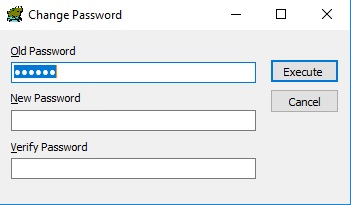
  2. A dialog window open as shown in the below image. Specify the new password in the New Password field and re-type in the Verify Password field and click on the Execute button.
Change Oracle user password using Toad

Now the password will be changed for the current user.

Steps to Change Password of Any Other User Using Toad for Oracle

  1. In Toad for Oracle, click on the menu Database > Schema Browser.
  2. The Schema Browser window will open. Then click on the User tab.
  3. In the User tab, select the user for which you want to change the password.
  4. Then do the right-click on that user and from the shortcut menu choose Alter.
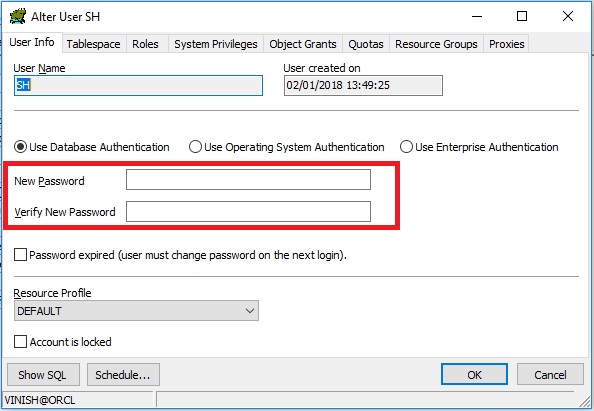
  5. The Alter User window will open as shown below. Then specify the New Password and click on the OK button to apply.

See also:

In this how-to guide, you will learn how to kill a session in Toad for Oracle.

To kill the session in Toad follow these steps:

  1. In Toad for Oracle, connect to the database with the user having ALTER SYSTEM KILL SESSION privilege or DBA privilege.
  2. After connecting to the Oracle database, click on the menu Database > Monitor > Session Browser.
  3. The Session Browser window will open, then select the session and do the right click on it and choose Kill Sessions option from the shortcut menu as shown in the below image.
Kill session in the Toad for Oracle example

The selected session will be killed immediately.

See also:


To generate HTML reports in Toad for Oracle follow these steps:

Generate HTML Report in Toad

  1. In Toad for Oracle, open SQL Editor by clicking on the Menu Database > SQL Editor.
  2. Then type your query in the editor for which you want to generate HTML report and press Ctrl+Enter or F9 to execute.
  3. You will get the result into the grid in Toad.
  4. Then do the right click on the grid and select Export Dataset option.
  5. Choose HTML Table from the Export Format drop-down list.
  6. In output choose File and type the filename in the File field.
  7. Then click on the OK button to generate the report as shown below:
Generate HTML report in Toad options

Output

HTML report output generated though Toad for Oracle.


Powered by Blogger.